
When you create a new workspace in CampaignLark, you will need to request approval before you can begin sending emails.
This process helps prevent abuse and spam from malicious users, allowing CampaignLark to maintain a high-quality sending environment for legitimate senders.
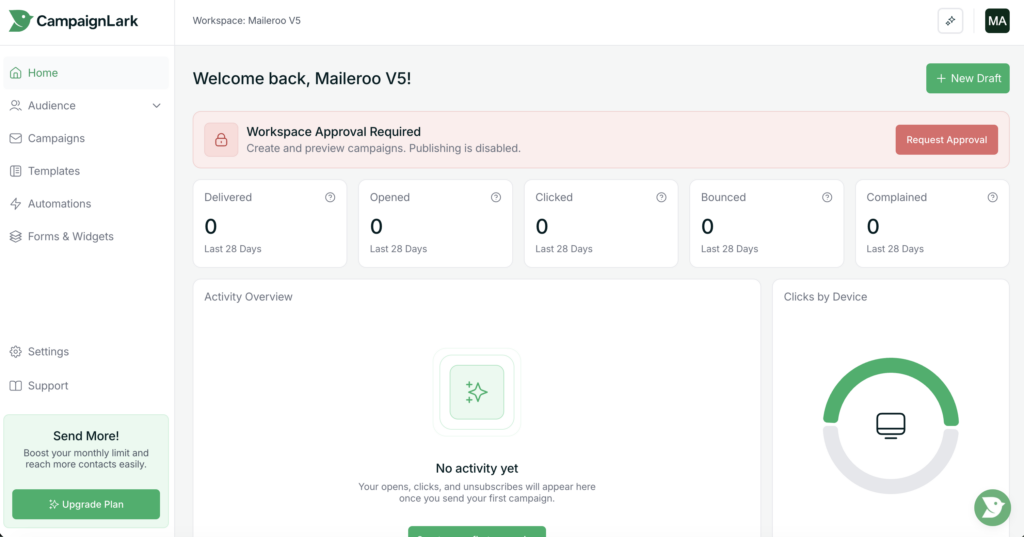
Starting the Approval Process
After creating a workspace, you will see a “Request Approval” button displayed in your dashboard.
Click this button to begin the approval process.
This will open a modal window containing a form that you will need to complete.
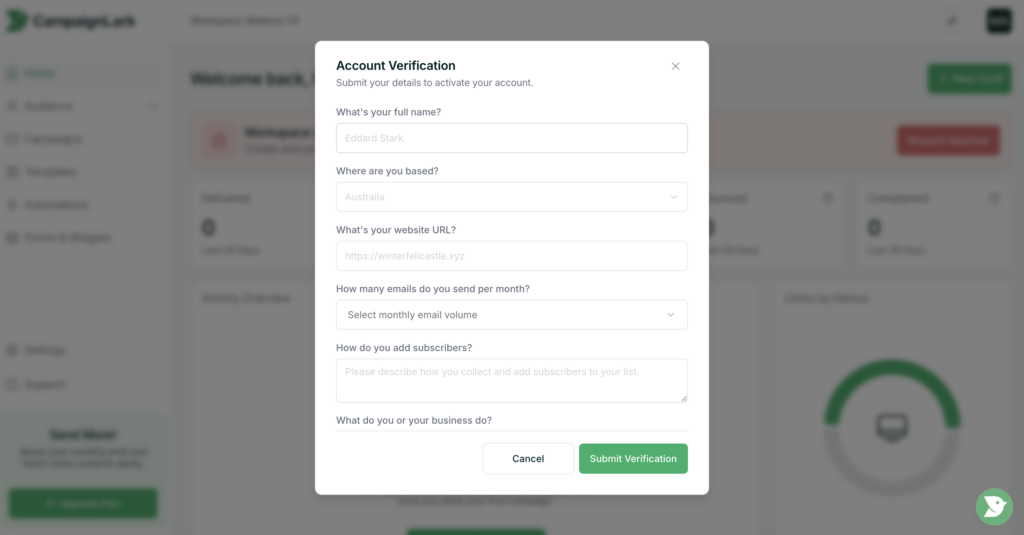
Completing the Approval Form
Within the form, you will be asked to provide information about:
Your business and its information
Your intended email use
The type of contacts you plan to send to
Please ensure the information you provide is accurate and genuine. Supplying clear details helps our team understand your use case and process your application faster.
Incomplete or vague responses may result in delays if our team needs to request additional information, or in some cases may lead to the request being declined.
Review Process
Once you submit the form, your request will be reviewed by the CampaignLark team.
If approved, your workspace will be activated for sending.
Approval for Additional Workspaces
Approval is required for each new workspace you create.
However, if your account demonstrates a history of positive sending practices, the review process for future workspaces is typically much faster.