
Campaigns are designed as one-time sends, each with their own report and delivery history. Re-running a completed campaign directly is not possible, as it would mix up the analytics between them.
Instead, you can clone it into a brand-new draft, which copies all the original details over, so you do not have to start from scratch, while keeping each campaign’s report clean and accurate.
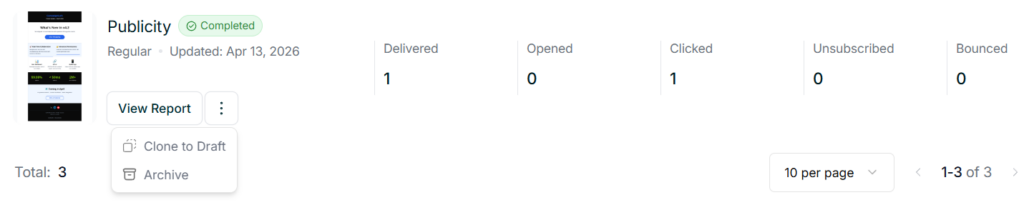
To do this, find the campaign you want to reuse from the Campaigns dashboard, click the three dots next to it, and select Clone to Draft.
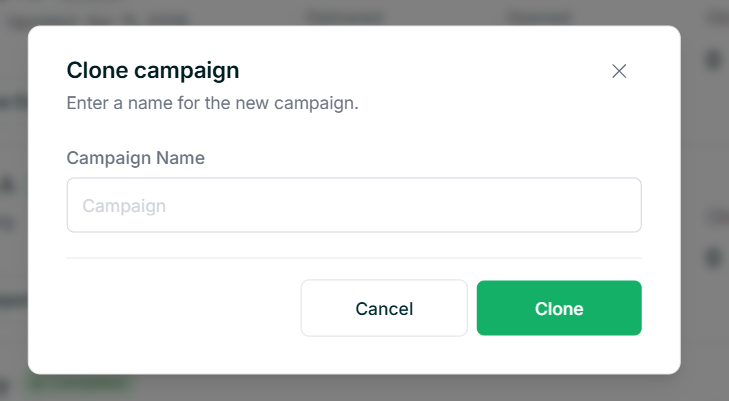
You will be asked to give the new campaign a name, and once confirmed, a copy of it will be created as a draft with all the original details carried over.
From the dashboard, click Continue Editing on the new draft to open it up. From here you can make any changes you need, or if everything looks good, just follow through the steps and send it as you normally would.

Tips
- Cloning is useful when you send similar campaigns regularly, like a monthly newsletter, as it saves you from starting from scratch each time.
- Since the clone is created as a separate draft, any changes you make will not affect the original campaign.